Brand identity and design direction for a promotions and sweepstakes company in the Chicagoland area.
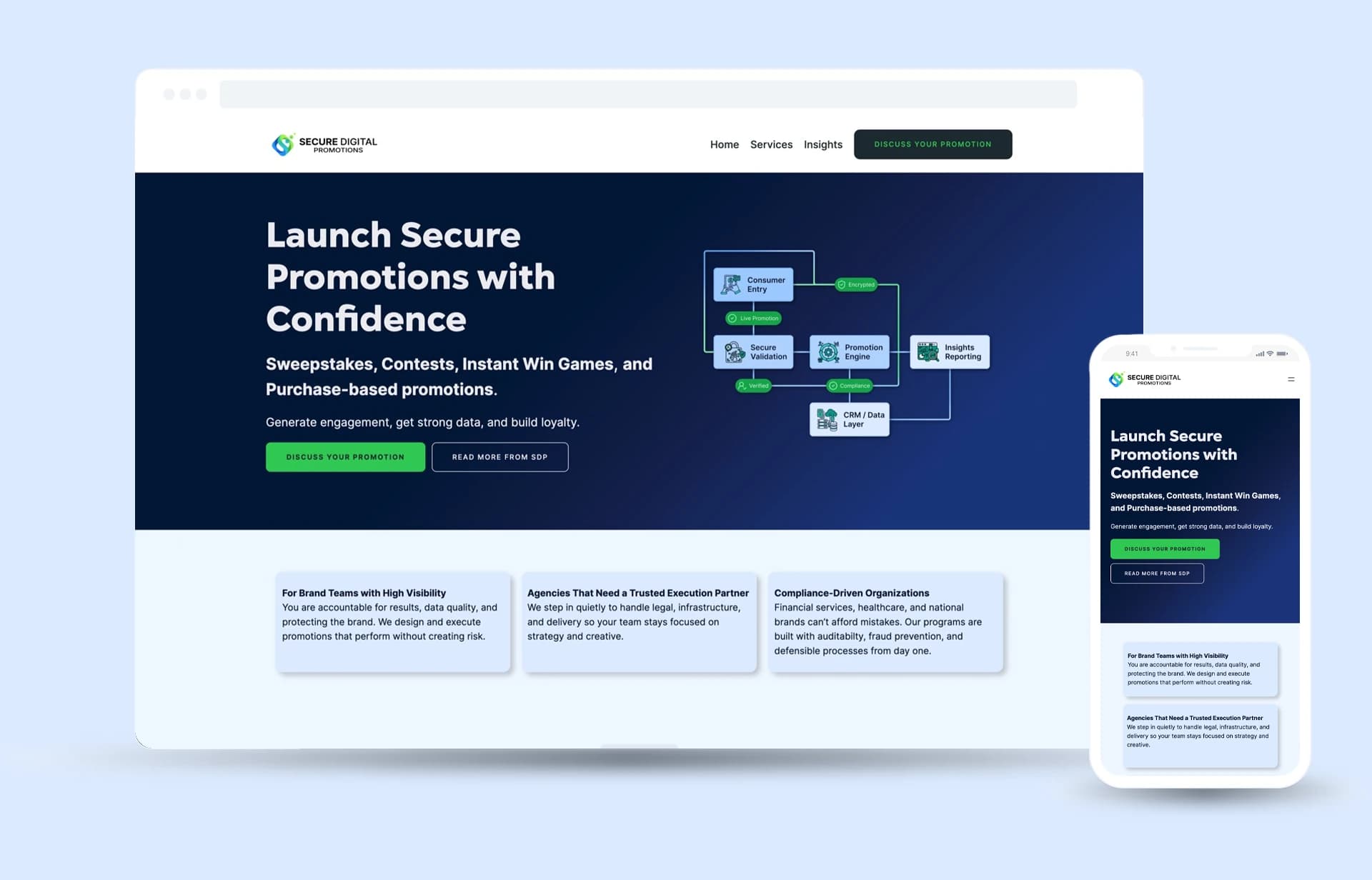
Secure Digital Promotions
Sweepstakes, giveaways, and contests for brands, run so that no bot, spam entry, or fraud reaches the company behind them, with AI used to push the security further than a manual review can reach. Two founders with deep industry experience came looking for a visual direction that matched it. I designed the brand and the system under it so a national campaign team could look at SDP and feel safe putting a campaign in their hands.
- A name
- To start
- A system
- Delivered
- A site
- Live today
Industry experience, a site they built, and three letters
Logo, brand system, and site direction
Their build, carrying the identity and layout direction
SDP isn’t selling excitement. It’s selling control, predictability, and trust, so the brand had to show that before it said it.
Act 01
Identity
Deciding what credible looks like in this category,
then building the system that says it.
Brief
The brand had to catch up to the experience behind it.
Two founders came out of a company that was winding down and started their own. They brought real experience in the industry, a name they believed in, and a site they built themselves.
The site did the plain job well. It listed the company’s services, and stated them clearly. The read that came back from people they showed it to was often some version of the same thing, that it looked like a site built by a capable executive. It was. The next step was to look like the company they were building.
Who it’s for
The promotion should be the fun part. This site is not a promo campaign.
Who enters a promotion?
Consumers, and the campaign has to be worth entering, but SDP never sells to them. The brands do. Building the identity for the entrant would have aimed it at the wrong person.
Who buys one?
A decision-maker answerable for risk, budget, compliance, and outcomes. They need to believe this has been done before and that they can see exactly how it works. The identity is built to reassure that reader first, and to look like nothing a consumer campaign would use.
That distinction set the brief. Organic enough to feel modern and human, structured enough to read as infrastructure. Every identity decision below resolves it in one direction or the other.
Name
The name was theirs. The job was making three letters carry a brand.
The founders arrived with Secure Digital Promotions, the promise stated plainly. What it needed was an initialism that could hold the identity on its own at the sizes a brand lives at, a favicon, an app tile, a sponsor row, the corner of a slide.
Mark
An S you read before you notice it’s an S.
The mark is two layered curves that trace an S without ever drawing one. It stays abstract enough to work as infrastructure and specific enough to be recognizable. The two loops interlock without merging, which is what SDP sits between, a brand on one side and the people entering its promotions on the other.
The wordmark does the same job in type. Secure is set heavy and Digital Promotions light, so the promise carries the weight and the category recedes. Gogh ExtraBold for the monogram, Inter for the wordmark, geometric where it needs presence, neutral where it needs to disappear into an interface.
Four lockups, each with a job rather than a preference.


Color
Green and blue were settled in the mark, and everything grew from there.
Digital is in the name, and the first drafts took that literally, pixel grids and screen static and the rest of the obvious moves. They looked like clip art. What worked was the opposite instinct, structure with flow still in it, and the two colors that mark landed on are the two the entire brand was built from.
Green is doing two jobs at once. It puts something organic against all that structure, and up in the lime range it reads cyber rather than natural. That is the brief answered in a color instead of a sentence, human enough to approach and built enough to trust.
By then I had designed enough brands to know what blue does. It reads as trust, and as corporate and professional, and it does that before anyone notices it is doing anything. Drawing a mark for a venture firm years earlier I had gone bank to bank and found the same answer nearly every time. Blue went in, and it happened to sit well next to the green. Across this category the color story was either generic or absent, so a committed pair was itself a position.
From there the palette runs out in two families, greens from lime through forest, blues from cyan through royal and down into navy. Navy is the same blue at the dark end. The two families overlap at teal, and that overlap is what lets a gradient cross from one to the other without a seam.
Pigment Green
#2FC853
Picton Blue
#27B2FF
Green Yellow
#A0F458
Oxford Blue
#011638
#32A129 → #AAF95C
#37D881 → #2ECAED
#02A6F2 → #04318F
The three logo gradients, and the teal where the two families meet
- Gradient, not flat
- The brand identity is gradient-led through the logo, so flat swatches under-describe it. Blue through green reads as motion and continuity.
- Print-ready
- Two colors are specified to Pantone. Those values are deliberately not the screen hexes, because a screen and a press do not reproduce the same color.
- Built to work without me
- The guide was written months before any build, so a banner, a flyer, or a business card could be produced correctly by a designer who never spoke to me. The live site is that working.
Interface color
Built on navy, with the light inverse kept in mind from the start.
Navy
#011638
Green
#2FC853
White
#F2F2F2
Void
#030810
The designed builds ran dark. Navy was the background, a not-quite-white carried the text, and lime was for CTAs and callouts, picked to hold against that navy to meet WCAG AA standards. Void sits in the palette as a black that isn’t pure black, specified in case it was ever needed.
The inverse was a blue-tinted white for the background with navy carrying the text. That light mode was never fully built out and neither original design build used one. It stayed an idea the palette was ready for.
Then came the build SDP made themselves, and the light version arrived there instead. They built from their own original site and kept it restrained rather than flashy, with white and navy carrying the page and the blue and green held back for callouts. The background is a light blue rather than a flat white, so the page keeps some flow in it and white cards read brighter against it than they would on white. Tang blue and a brighter green pick out keywords in the headings, and the buttons run dark with light green type. The lime recedes, which is the system working, not drifting. Its whole job was contrast against a dark field and that field is gone.
Gradient stayed but changed jobs. On screen it lives on buttons and cards, where it can be built and maintained, rather than as the full-page wash every later build would have had to reproduce.
Act 02
System
A visual language, and a rule for where every part of it belongs.
Goal
The stated brief was plain. What SDP does, why it is safe, how to start. The question underneath was harder. What does credible even look like in this category, and who decides?
Frame
It should feel like something you operate, not something you read.
SDP sells a service, but the promise underneath it is operational: entries verified, rules enforced, results reported. The site’s visual language borrows from the categories buyers hand that kind of promise to.
Fintech
Money moving between strangers, with a record of it afterward. Controlled logic and a measurable return.
Cybersecurity
Risk named out loud, then contained. A security surface, not a gimmick.
Enterprise SaaS
Structure at scale. Modular, repeatable, and defensible in a procurement review.
Those three industries run on reliability and accountability, which is what SDP is selling too. Borrowing their visual register means a buyer reads the offer in a form they already know how to trust, instead of having it described to them.
Rules
A system is defined as much by what it refuses as by what it allows.
Allowed
System-driven compositions borrowed from enterprise software. Custom line-work imagery for security, data, and compliance. Diagram-style graphics that explain a process step by step. Structure over flourish.
Refused
Lifestyle photography. Vague or abstract hero imagery. AI-generated concept art. Heavy 3D and glassmorphism. Playful editorial illustration. Each one would have read as a consumer campaign, which is the wrong buyer.
Glassmorphism is the line worth explaining. The first design used it. The component kit behind the second one couldn’t carry it, so it went. By the time this direction was written, leaving it out had become a choice rather than a consequence. The softer, glassier register reads consumer, and this buyer is not one.
The constraints were set before the imagery was. Everything had to work inside WordPress, as static scalable vector assets, with no animation or effects brittle enough to break on someone else’s build. Deciding that first is what kept the direction honest, because nothing in it was going to be impossible to ship.
Narrative
Every section was specified by the feeling it had to leave behind.
The founders wanted the site to work as a story, and the shape one of them had in mind is the one many myths use. The client is the hero with a campaign to launch. SDP is the guide they meet on the way, holding the thing that gets them there.
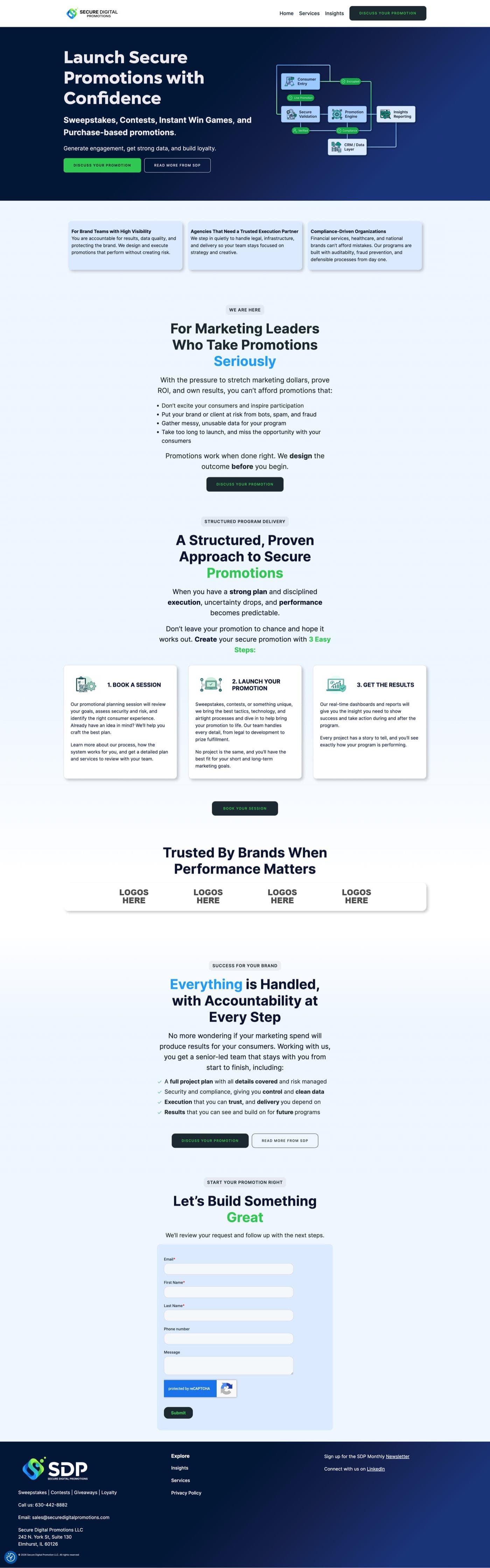
My job was turning that into something buildable. The page is written top to bottom as a sequence of emotional states, each with the sentence the reader should be thinking by the end of it. Layout followed from that, never the other way round. All of it written for the site that was already live.
- 01
Hero
Establish infrastructure, reduce risk, set the tone
“This is a secure operating system for promotions.”
- 02
Three tabs
Reassurance through structure
“Here's what that system delivers, at a high level.”
- 03
We are here
The pressure acknowledged, then contained
“They understand what I'm managing, and it doesn't have to sit with me.”
- 04
Program delivery
Relief, through a process in three steps
“There's a defined process, and I can see where I'd start.”
- 05
Trust and logos
Validation, and permission to proceed
“Someone like me has trusted them, and it worked.”
- 06
Success for your brand
The hand-off, and what stops being yours
“Here's what choosing them takes off my plate.”
- 07
Final call to action
Momentum, and a low-friction commitment
“This is the obvious next step, not a sales trap.”
The page the spec was written for, walked one section at a time. Each step carries the job that section does, then “what a buyer should be thinking” by the time they scroll past it.
Act 03
Evolution
Three builds between September and February. Each one answered a constraint the last one ran into, and the direction got sharper every time it had to.
The gap
A signed-off Figma file is still not a website.
What a handoff assumes
A designed system in Figma, developer annotations, and prototype links. The standard handoff, done properly. It assumes a developer with time and a budget waiting on the other side of it, and at founder stage that is the thing most likely to be spoken for.
What that changed
Feasibility became a design input, not someone else’s problem downstream. From the second version on, every decision got tested against what the team could build and maintain. That is a harder constraint to design inside than taste, and a more useful one.
The first build, then the Chakra rebuild
The first design was approved. The second was built to be handed over.
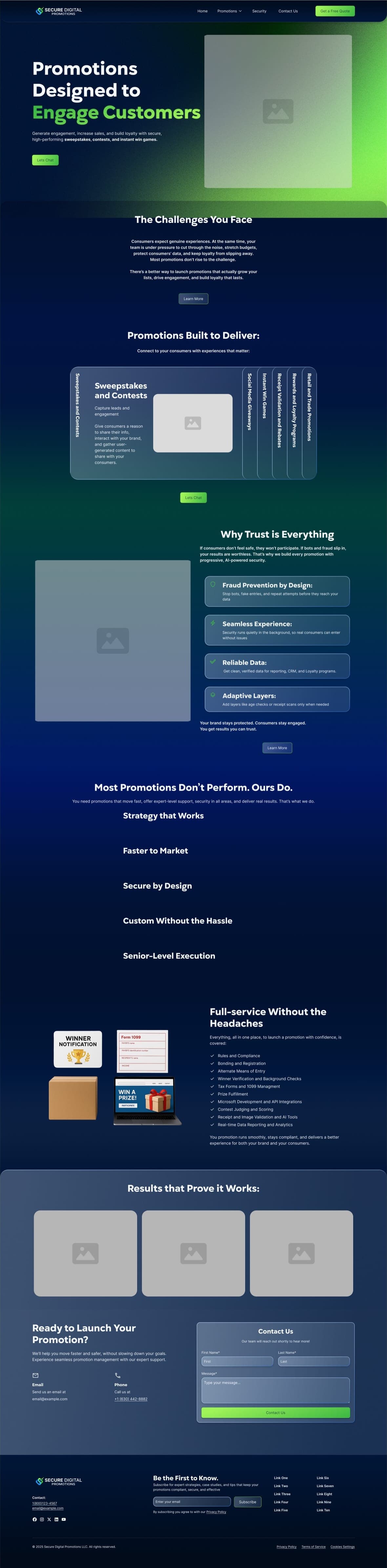
The first design is where most of the brand went. Signed off early, gradient-led and dark, carrying the identity the full length of the page. It stayed a design, because the developer time and build budget it needed weren’t available at that point, and waiting for them would have cost the company months it was better off spending in front of clients.
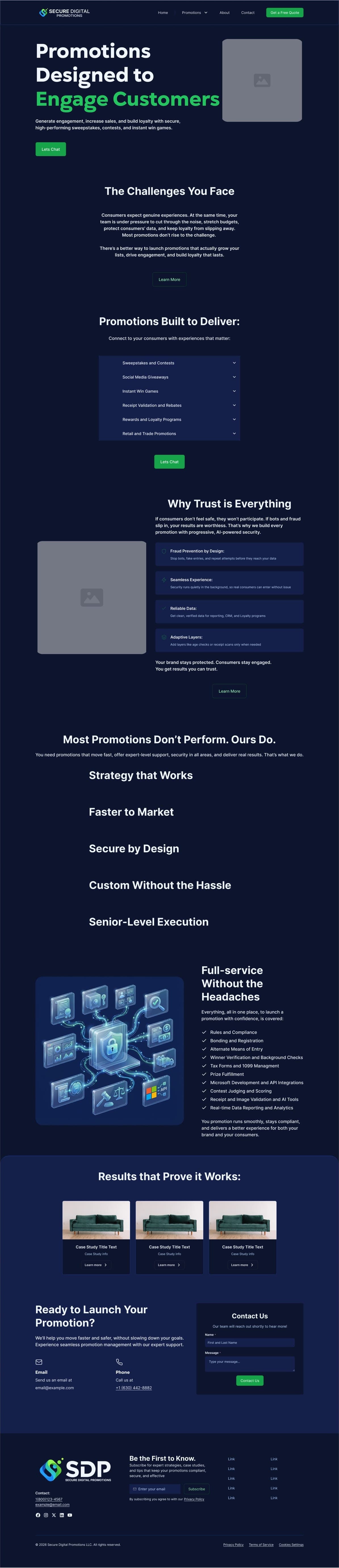
Using the first design as inspiration, it was rebuilt inside the Chakra kit, chosen for exactly one reason. Chakra publishes copyable component code, which makes a handoff mechanical instead of interpretive. That part worked, at a cost you can see below. The gradient settles into a single navy field and the layout moves toward the kit’s defaults. Feasible won over expressive, knowingly, because a buildable site in the room beats a better one in a file.
Neither version carried real imagery. The visual direction was still being settled, so both were built on placeholders, which is why neither hero resembles the one that eventually went live.
The first design
The Chakra rebuild
Hero
Challenges
Capabilities
Trust
Promise
Scope
Proof
Close
The first design. The gradient carries the page.
The Chakra rebuild. Same structure, handoff solved, gradient gone.
Both shown at the same scale, section against section.
The live site
A new build was live, which made it the one worth directing.
SDP stood up a WordPress site themselves so they had something to send while the build question stayed open. They came back wanting what they had wanted from the start: a visual direction that made the whole thing read as one company, with the storytelling flow they came in with carried all the way through.
The direction was written for that build. A section-level framework, the seven-part narrative above, a visual job and an allowed-and-refused list per section, and an explicit split between what was worth finalizing now and what should wait. All of it scoped to work inside WordPress with static vector assets, because that was the build that existed.
What I gave was directional: layout, placement, and what each section had to accomplish, worked into what they had up. The build itself stayed theirs.
The hero image
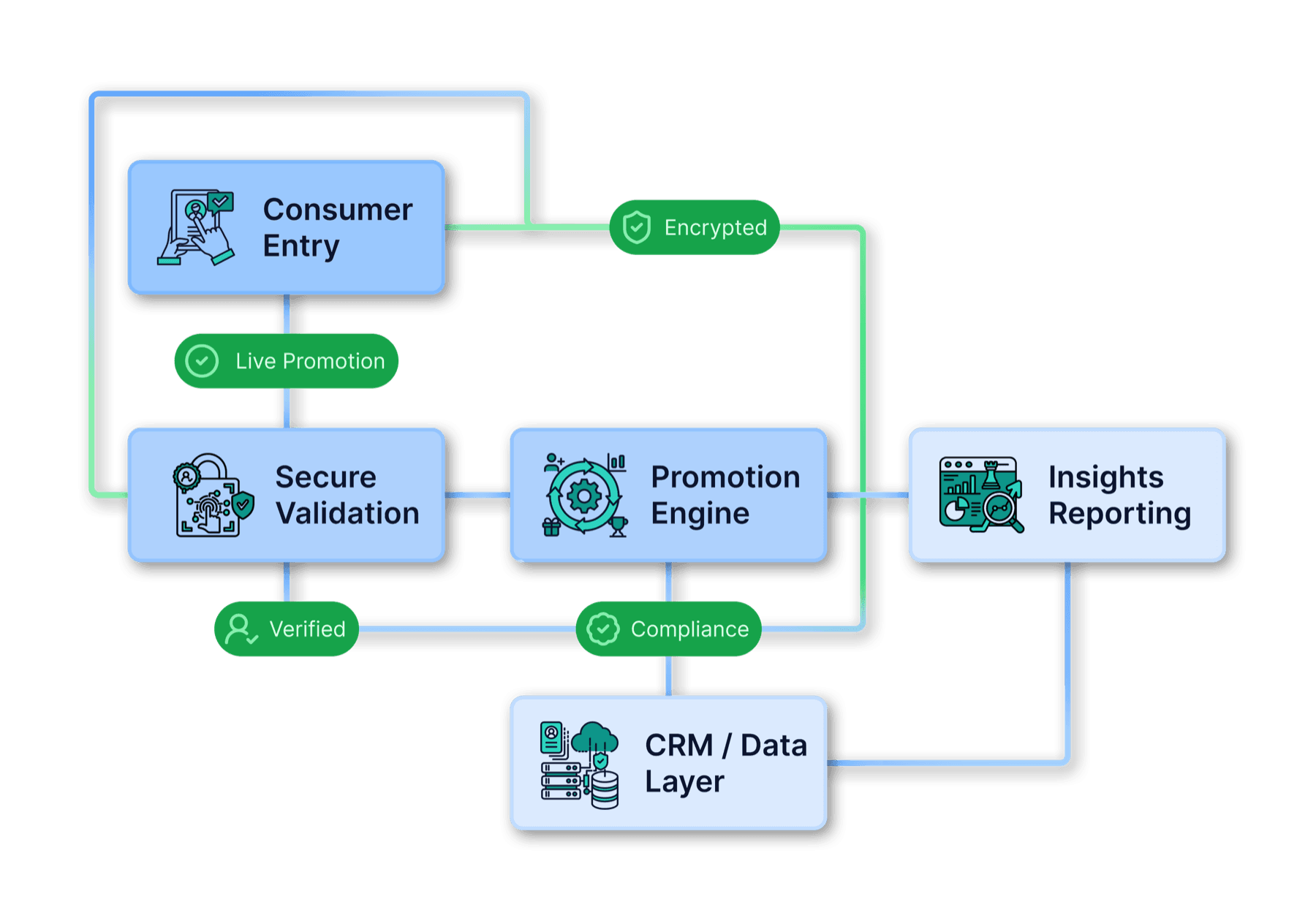
The refused list ruled out every easy hero, so the answer was to draw the service.
The hero was the one section that wouldn’t resolve. A headline on its own left it feeling unfinished, and everything a stock library offers had been refused: lifestyle photography, abstract concept art, anything that reads as a consumer campaign.
What was left was the work itself. Running a promotion cleanly is mostly invisible, and the buyer is being asked to trust it. The diagram gives that work a shape: where an entry comes in, what it has to clear, where the data comes to rest. It shows the flow without exposing how any single part of it is done, and it was simple enough to survive a WordPress build, which by then was the constraint that decided everything.
Outcome
The brand system is in daily use. The site they send to prospects runs on the identity and the layout direction I set.
What the engagement produced was a decision: what a company in this category should look like, who it should be talking to, and what it should refuse to look like. That held across three separate builds on three different stacks, which is the strongest thing I can say about it.
Act 04
Next Steps
Act 03 is where the engagement stands.
These are the options now, and why the answer is different than it was a year ago.
What changed
The constraint that shaped every version has moved.
One constraint ran throughout the project. What a designer hands over is a design, a demo, and someone else has to turn it into a live site, a product. Every version had to bend around that. The first waited on a developer whose time was already spoken for. The second traded brand for a handoff that would pass. The third got built by the client themselves on a CMS, because they needed something live.
Then two things landed at once. AI got good enough to build a real front end, and Figma shipped a native MCP server. The second one matters more than it sounds. Before it, the loop only ran one way, and asking for one small change meant an AI tore the whole build down and started again, usually breaking something else on the way. Whatever it produced could not be brought back into Figma to be edited, so you were stuck with what it gave you.
The MCP closed the loop. A design idea becomes code, code is visually translated as an editable Figma file, which can be further refined into real components and variables. If needed, a single button can be pulled out, fixed, and put back without rebuilding the whole page around it. The design and the build stopped being two artifacts handed between two people.
The coded build
Built to show the original vision was finally buildable.
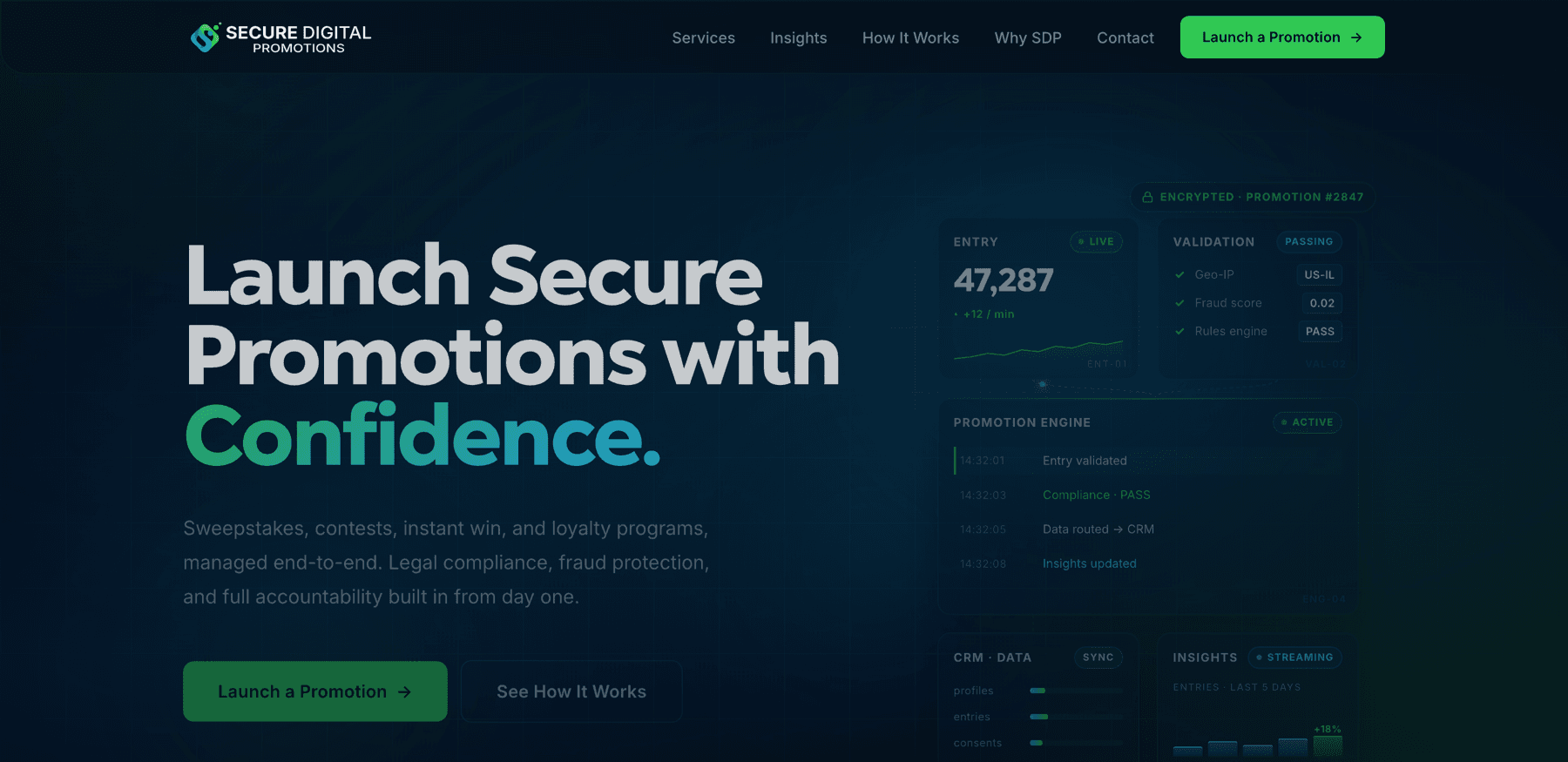
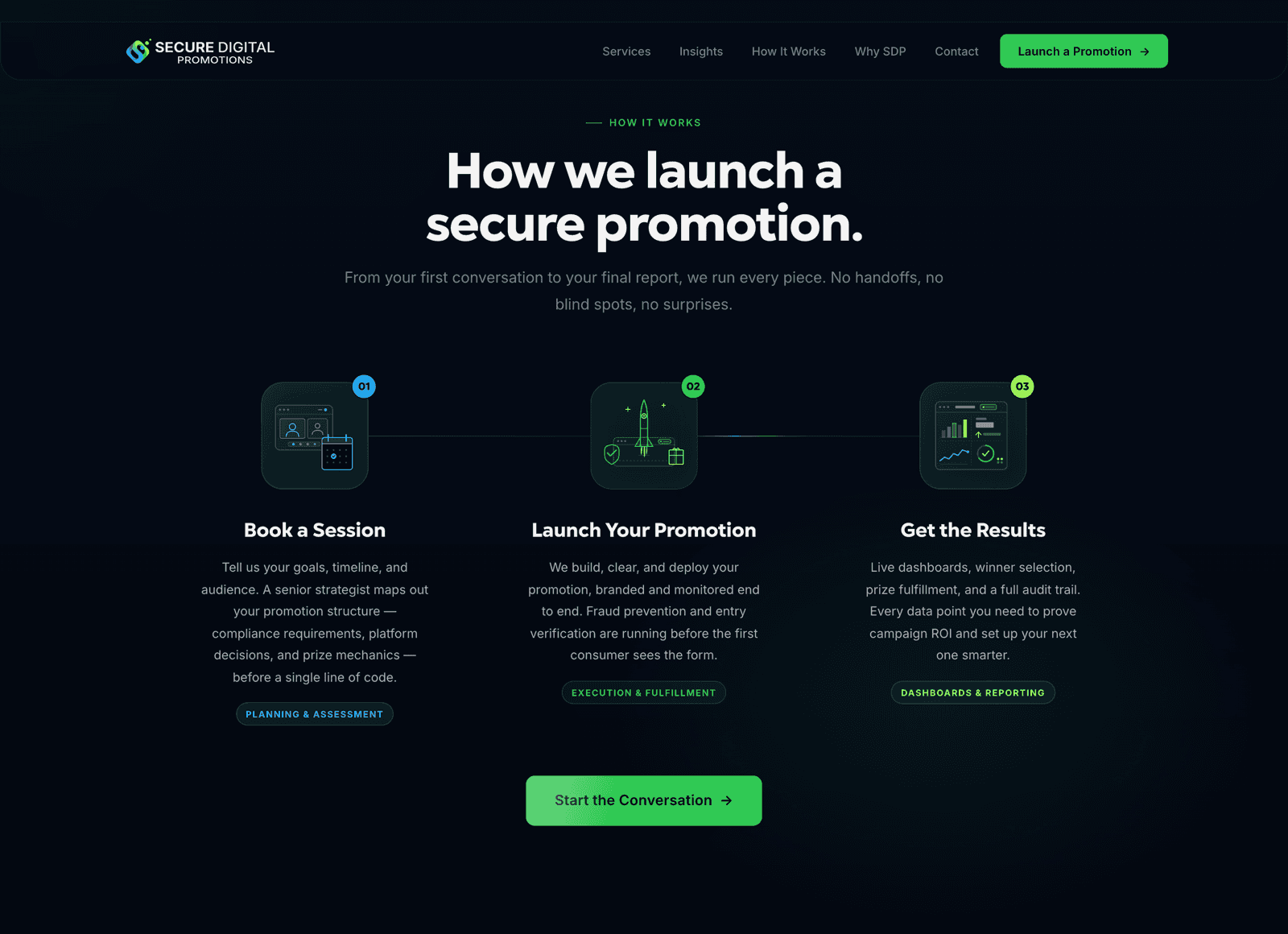
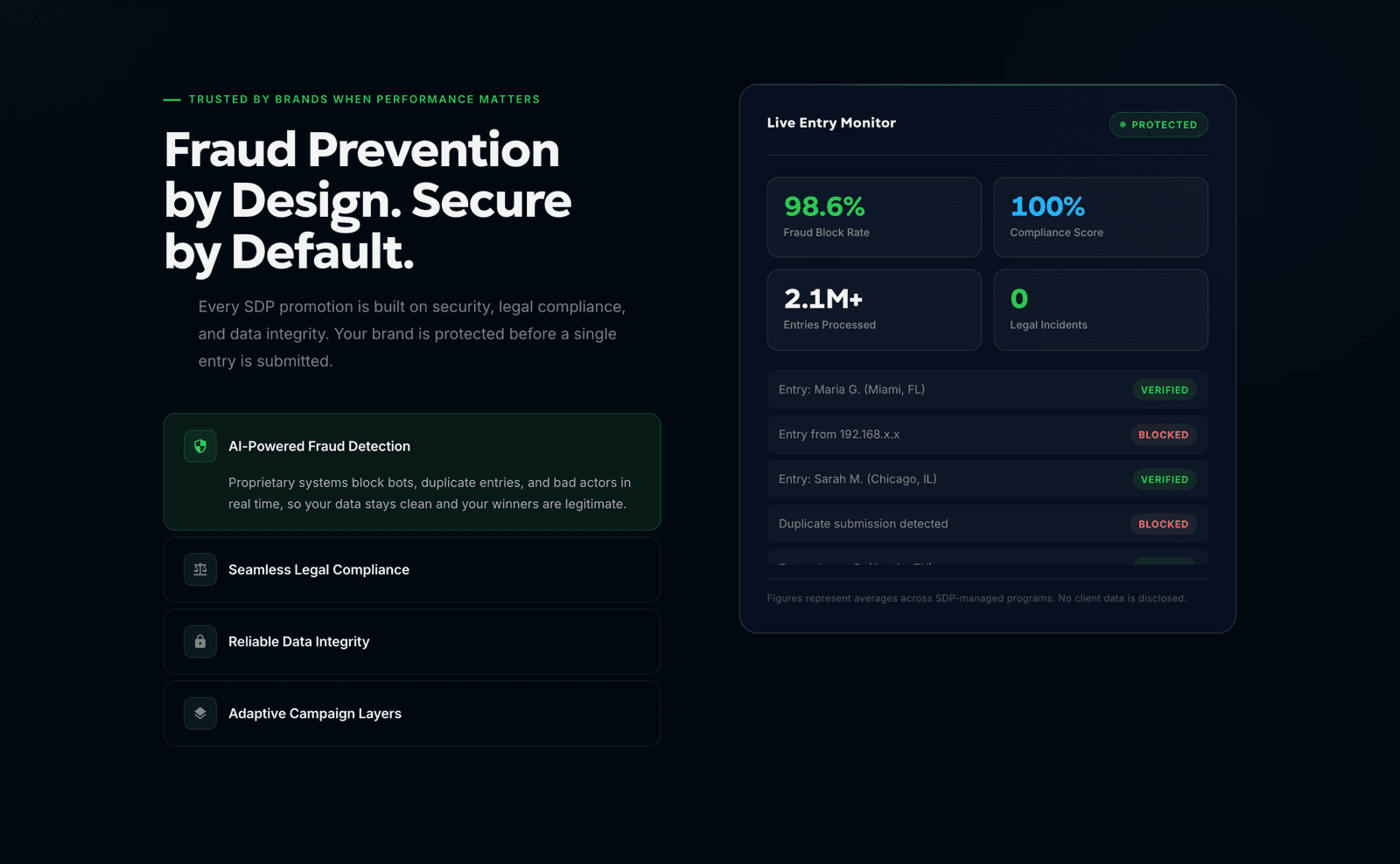
I pulled the system out of Figma and built the site itself. An interactive prototype is a file that behaves like a site without being one. What went up instead is a working front end deployed to a public URL, in the visual styling the brand had been aiming for from the start.
This one was mine to take on, outside any scope. I wanted to learn what AI could do, and I wanted to see the original vision exist. What is on the screen matters less than what it proves. The version we kept setting aside for a better moment no longer needs one. What was once out of reach is now within reach.
The recommendation
The value is that a design can now go live.
If the original direction still holds, it is far more attainable now, in time as much as in budget. If the visual styling has moved past what feels viable today, which is fair after a year and a shift in what this category looks like, the same tooling gets to a newer answer just as fast. None of it is urgent. Whenever the team is ready, there is more within reach than there was.
What is worth adopting is a process. Keep Figma for what it is still best at, the system and the visual decisions, and let AI carry the build alongside it instead of after it. Turning a decision into a working page used to be the slow, expensive step, and it is now one of the easiest. Which changes what can be decided early, and what can wait.
Worth building now
Vector and UI-style imagery for the hero, line-icon imagery for the supporting sections, diagram graphics that break down a process, and a background template system that case studies and blog posts can inherit.
Worth waiting on
Complex styled visuals, motion and micro-interactions, full interactive states. Real value in all of it, but none of it changes whether a buyer trusts the page, and committing early forecloses better ideas.
Highest visual result for the least time spent now, and a foundation to refine against later, without making premature commitments ahead of the bandwidth to act on them.
Close
The decision underneath outlasted every build on top of it.